


隨著最新一代 iPhone 18 Pro 正式登場,家中的無線投影設備還能完美相容嗎?這次我們直接拿最新的 iPhone 18 Pro 來進行實測,看看最新的 iOS 系統搭配電視棒表現如何!
iOS27 螢幕鏡像輸出
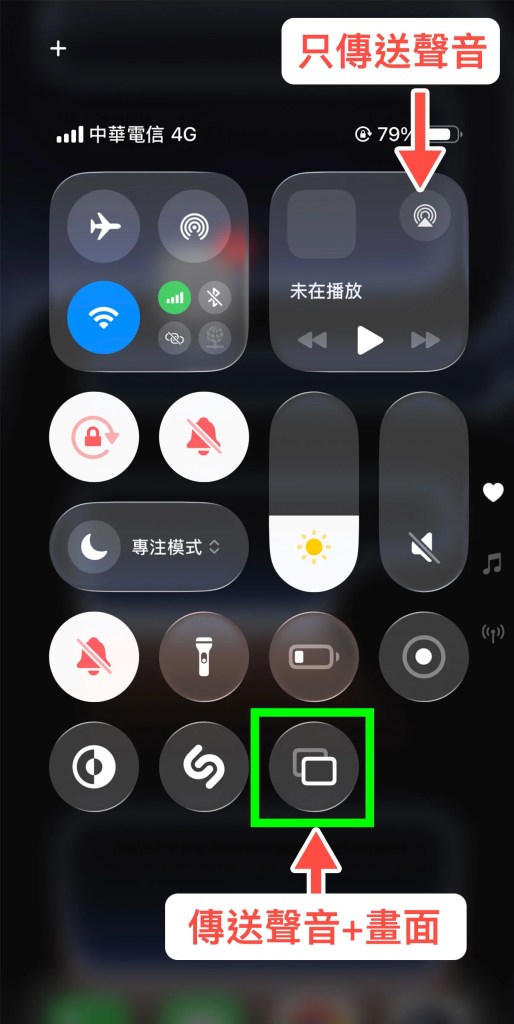
從iOS 26 版本開始介面有了大幅度改動,不少用戶在操作時容易找不到功能,甚至會將 AirPlay 與 螢幕鏡像輸出混淆。
在這裡要特別提醒:進行投影時務必選擇 「螢幕鏡像輸出」,才能確保畫面與聲音完整同步傳輸到電視。
更完整的 iOS 螢幕鏡像輸出教學:iPhone 17 螢幕鏡像輸出 教學|iOS 26 如何投影畫面到電視
投影 電視棒
(延伸閱讀:如何安裝 AnyCast 電視棒)
iPhone 18 Pro 螢幕鏡像輸出 畫面
本次使用 iPhone 18 Pro(版本 iOS27)實測投影


實測 iPhone 18 Pro 投影畫面
首先測試的是 iPhone 本身的照片、影片與檔案。在 iOS 27 環境下,透過「螢幕鏡像輸出」即可直接將整個畫面同步到電視。
實測結果 ✅

實測 YouTube 投影
接著測試 YouTube App,請記得投影時使用「螢幕鏡像輸出功能」。
實測結果 ✅


實測成果
iPhone 18 Pro ( 版本 iOS27 ) 搭配進電視棒都能順利播放,無論在辦公室簡報、家庭影院或日常娛樂都有不錯表現。
對於經常需要外出簡報或喜歡居家大螢幕娛樂的使用者可以放心使用電視棒投影內容。
推薦文章
The iPhone 17 series has officially arrived, bringing notable breakthroughs in both hardware and software, with overall performance continuing to evolve at an impressive pace. This generation not only enhances processing power and display quality but also optimizes connectivity features, making it an ideal device for multimedia experiences.
In this hands-on test, we paired the standard iPhone 17 model, running on iOS 26, with the AnyCast TV Stick to evaluate its screen casting capabilities. The goal was to examine how well the iPhone 17 handles different projection scenarios, including streaming videos, presentations, and live event playback. Through this comparison, we aim to provide a clearer picture of its stability, responsiveness, and compatibility, helping users understand whether the iPhone 17 series can deliver a smoother and more reliable casting experience in everyday use.